
YooMoney MIR Card: How to Get One as a Foreigner
 By Irena Domingo
Updated on
In This Article
- It is now possible to get a Russian MIR card even without being in Russia. You can verify your YooMoney account through a remote identification (KYC) process using a selfie and your foreign passport. This allows you to activate the maximum limit of up to 500,000 rubles and request a physical card to be shipped to your country.
- You don’t need a Russian phone number: you can use your foreign mobile phone.
- In this article, I’ll explain step-by-step how I did it from Spain.
This is step 7 of my guide to planning a trip to Russia in 10 steps, where you’ll find everything else in order.
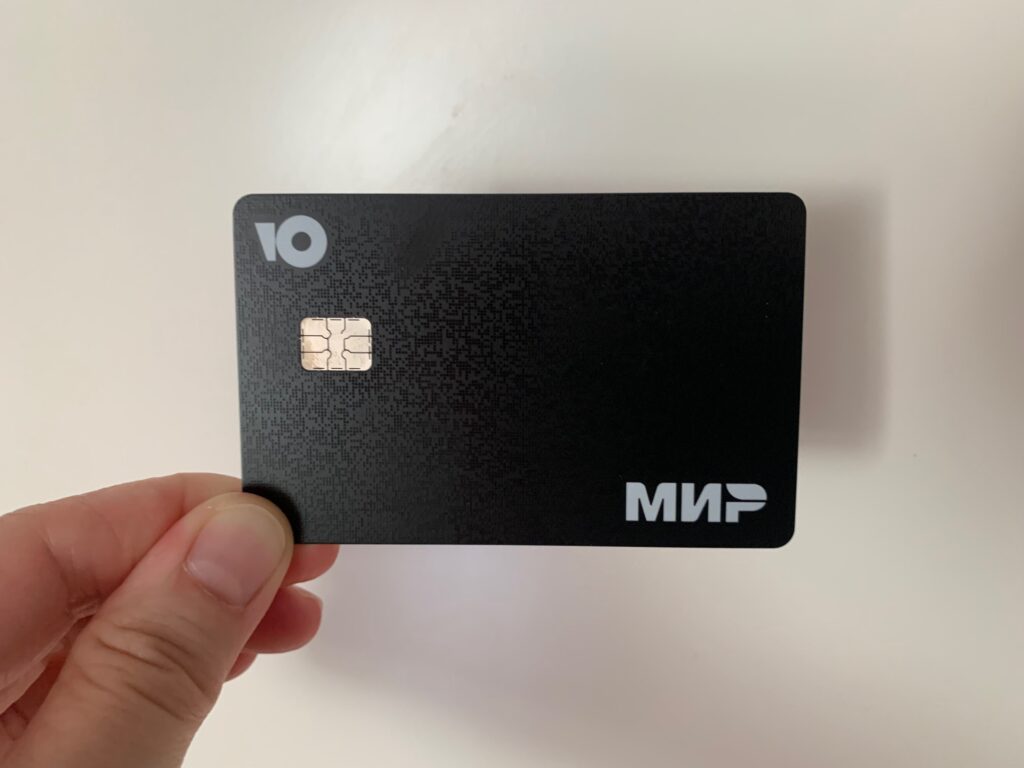
1. What is YooMoney?
YooMoney (formerly Yandex.Money) is a Russian payment platform that works similarly to Revolut. When you create an account, you instantly get an e-wallet and a Russian virtual card that you can use to pay in stores and online services within Russia. It supports online payments, mobile apps, and physical terminals that accept MIR. Since 2020, YooMoney has belonged to the Russian bank Sberbank.
In addition to the virtual card, you can request the physical version: the YooMoney Travel Card, issued under the MIR system (Russia’s equivalent of Visa or Mastercard). This card allows you to:
- pay in stores, restaurants, hotels, trains, or taxis;
- withdraw rubles from any compatible ATM;
- make contactless payments and online purchases on Russian websites.
Until recently, this physical card was only available within Russia, for example at some airports or YooMoney offices in Moscow. But now, YooMoney allows foreigners to apply for it online and have it delivered directly abroad, as long as they complete the verification process (KYC) and top up their wallet beforehand to cover the 799-ruble shipping fee. That’s how I did it, and below I’ll walk you through the steps I followed.

2. Step-by-step: how to get a physical YooMoney MIR card
First. Register on YooMoney
The registration process is done directly on the YooMoney website. Just click “Sign up,” enter your details, and follow the email verification steps. All you need to register is a mobile phone number (from any country) and an email address. If you are using Mac, use the browser Chrome (instead of Safari).
Once registered, you immediately receive a wallet number along with an anonymous Russian virtual card, which theoretically allows spending up to 15,000 rubles per transaction. However, to top it up, you’ll need to go through the verification process first.

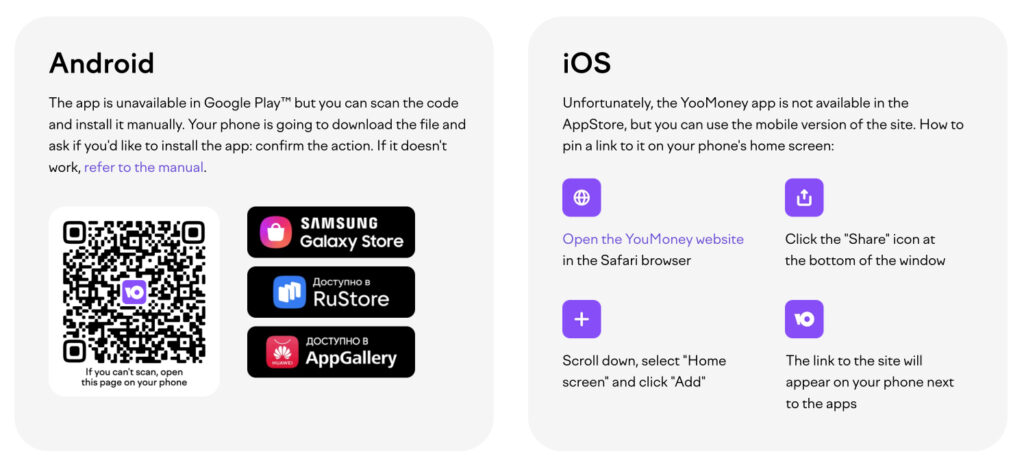
For Android, the app is not available on Google Play, but you can scan the code on this page: https://promo.yoomoney.ru/mir_rb_en to install it manually. Your phone will download the APK file and ask if you want to install the app: just confirm. If it doesn’t work, there’s a guide on that same page.
For iPhone, the app is not on the App Store, but you can use the mobile version of the site. To add a shortcut to your home screen, open the YooMoney site in Safari, tap the share icon (box with upward arrow), scroll down and select “Add to Home Screen.” The link will appear like a regular app, although it runs in Safari every time you open it.
Second. Verify your identity (KYC)
Identity verification is a key step known as KYC (Know Your Customer), a process also used by platforms like Revolut, N26, or Wise. It allows YooMoney to comply with financial regulations and unlock advanced features like increasing balance limits and requesting a physical card.
The process can be done directly in the YooMoney mobile app. It involves taking a real-time selfie while moving your head in a circle (using your phone’s front camera), and then scanning the passport page with your personal information.
In my case, the selfie worked fine, but the passport scan was more difficult — I had to try several times before the system accepted it. In the image below, you can see how the identity verification process looks on mobile (it uses the system from Russian telecom company MTS).


Once you pass verification, you move from “anonymous user” to “verified user” with a 500,000 ruble limit.

Third. Top up the wallet with rubles from abroad
After the verification process, you now have a Russian virtual card with a limit of 500,000 rubles. It took me about 30–40 minutes to complete the whole process. So far, so good. The problem is how to top up your wallet in order to request the delivery of a physical Yoomoney card to your country, since it costs 799 rubles.
There are three ways to add funds:
Top up with cash
You can top up in Russia with cash using a Sberbank ATM, or you can also do it at some of the YooMoney offices in Moscow.
Top up with your foreign card
This is the easiest option, although not all cards work. Recently, I was able to top up my account with a Visa card, but I couldn’t do it with a MasterCard or a UnionPay card. It’s also worth mentioning that the exchange rate applied by Yoomoney isn’t very good. The top-up process is very straightforward:


Top up using an exchanger
If your foreign card doesn’t work for topping up, you can use an exchanger listed on Bestchange to convert your money (euros or dollars) into rubles and transfer it to your YooMoney wallet.
I used the third option, although it wasn’t easy to find an exchanger that supported it. First, I couldn’t find any exchanger that allowed direct transfers from a European card (Visa or MasterCard) to YooMoney. However, I did find several that allowed transfers from a Volet account (in euros or dollars) to a YooMoney account. If you don’t have a Volet account, you can open one easily by going through a verification process with a selfie and passport (note that Volet is not available in the USA).
And here comes the second problem: exchangers that allow you to convert your Volet balance into YooMoney typically require a Russian phone number (Russian SIM card) to operate with SPB’s mobile money transfer service (the most popular in Russia). They won’t accept a foreign number linked to your YooMoney account.
However, after checking a dozen exchangers, I found one that worked: IziBTC. Unlike the others, it only required a verified (KYC) YooMoney account — no Russian number needed. I contacted them and tested it by sending €30 to my YooMoney wallet. The exchange rate wasn’t the best, but not terrible either: I received about 2,340 rubles, that is, approximately 78 rubles per euro.
Keep in mind that you must top up your Volet account first. Also note that Volet may still appear under its previous name ADVcash on this platform, and YooMoney may be listed as Yandex.Money.

PS: I also looked into the option of converting my USDT from Bybit via P2P market, but all the offers required a Russian SIM card.
Fourth. Request the physical MIR card from the app
Once my wallet was topped up, I requested a YooMoney MIR card from the app, which cost 799 rubles for shipping. I was able to enter my address in Spain, and at the end of the process, I was informed that the card would take around 20 days to arrive, first via Russian postal service, then my local postal service. You can choose to have your name printed on the card or receive one without a name.
It finally arrived in 16 days (delivery time may vary by country — they say 2 to 6 weeks on the website). The shipment comes with a tracking number that you can use both with the Russian postal service (with VPN) and your country’s postal system (in my case Correos.es).

The back of the card includes the card number, expiration date (valid for 5 years), security code, wallet number, and a QR code to install the app on your phone. The front of the card can either display your name (if you choose that option) or be nameless (as I chose).
The physical card must be activated like any bank card. To do this, log into the app (or the YooMoney website), select your physical card, enter the card number, confirm the operation with a code sent to your phone, and finally choose a PIN.


Lastly, I’ve tested both the virtual and physical cards, and both work perfectly for online purchases on Russian websites. So I can confirm they function without issues.
3. Conclusion
It’s now possible to have a fully functional Russian MIR card before traveling to Russia for payments at restaurants, stores, or ATMs.
Also, if you top it up before your trip, you can use it to:
- buy train tickets on the official RZD website (with VPN);
- purchase tickets for the opera, theaters, and museums in Russia;
- send money to Russian friends or family;
- etc.
Getting a Russian bank card from outside the country is no longer just for residents or Russian citizens.
If you’re traveling to Russia and want to be fully prepared, you can follow the same steps I took with Yoomoney and reduce your dependency on cash. If you don’t want to go through all these steps and prefer to get your card once in Russia, another good option is to get a T-Bank card (formerly Tinkoff).
I hope you found this article helpful. If you have comments or questions, feel free to post them in the Russiable Community.
In This Article
Was this useful? I'll tell you when something changes in Russia
One short email a month with what has changed for travellers (visas, payments, border crossings, apps), based on what readers report to me from Russia. More than 4,000 of us already. No spam: if you ever lose interest, unsubscribing is one click.
Irena DomingoAbout Me
I was born in Russia. I grew up between two worlds: my father was Russian, my mother Spanish — a descendant of the "Children of Russia", the Basque children evacuated to the USSR during the Spanish Civil War. I've worked as a translator, interpreter and Russian teacher for over 30 years, and since 2013 I've been writing this blog to help travellers discover Russia with practical, always up-to-date information. Author of the Russiable Guide. If this blog has helped you plan your trip, you can buy me a coffee ❤️.
 How to Pay in Russia in 2026: What Works and What Doesn’t
 Pay in Russia: The Virtual Russian Card Accepts Visa and Mastercard Again
 Why Russian Banks Reject Your Banknotes (and How Much You Can Exchange at Once)